
How To Change Primary Domain Name at Hosting

How To Change Hosting Primary domain Name?

Please log in to your client area, where you can update the domain name associated
with your cPanel or Plesk hosting.

Now Click the view details Button.

Hostagle_domain_name_change.png


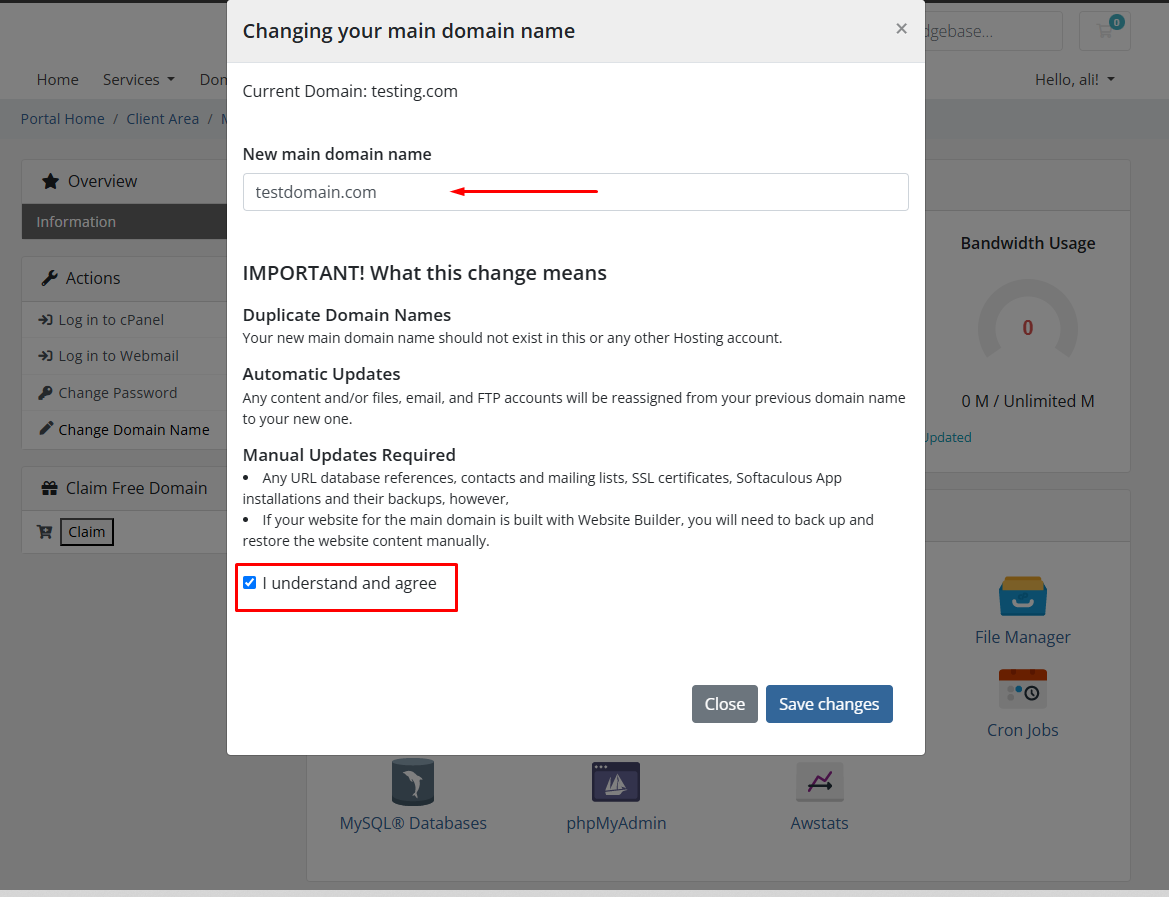
Click The Change Domain Name a Popup appears.

Hostagle_domain_name_change1.png

Hostagle_domain_name_change2.png


Here you can enter the domain name according to your desire. Also please check the
field of understand and agree. And click Save Changes.
 

Your domain is successfully changed.


Also you can see this domain on your cPanel by simply clicking the button of log in to cPanel.

Screenshot_17.png


Conclusion:
Thank you for reviewing this document. If you have any questions or need further
assistance, please feel free to reach out.


  • 0 کاربر این را مفید یافتند
آیا این پاسخ به شما کمک کرد؟

مقالات مربوطه

How to install free SSL ?

How to fix not secure error on your domain or How to install Free SSL Letencrypt over AutoSSL?...

Custom PHP Limits using .user.ini

To add custom php limits like memory limit,Upload limit You can do it from .user.ini file Create...

How to Add DMARC Record in cPanel ?

A DMARC record is used to validate emails in order to prevent email spoofing. DMARC -which...

How to protect your cPanel/WHM from hackers ?

- Don't Save your Password in Browsers- Use Secure browser Google chrome for better security as...

How to fix CPU Overload/Abuse Issues ?

Hello,This article will help you with fixing CPU Overload/Abuse issues for your cPanel accounts....